CSS样式表
在前文"标签与格式"中,我们了解了如何使用html进行最基本的排版。那么,当我们想要进行更进一步的排版,例如调整字体、字号、字色等,应该怎么做呢?
有一种最简单的方式是使用行内属性为每一个标签进行调整,但这样就会陷入一个困境,如同我们使用word文档转成页面那样出现大量的重复赋值。这个时候就要用到css样式表了!
什么是CSS样式表?
一句话概括:提前写好的格式。在CSS中可以预先为标签设定其格式并应用于页面中。
CSS有两种写法,第一种是在每个页面的head标签中都可以使用一对style双标签,另一种则是先单独编写css文件,然后使用link单标签来链接。
无论是head内的style标签,还是行内属性的style,它们的写法都是一致的。
如本文中,使用css编写了如下默认格式:与先前一样的,我将用注释的方式来阐述其分别起到了什么作用。
<!--整个body标签中的字体-->
body {font-family: Segoe UI,'微软雅黑',sans-serif;}
<!--color: maroon; 所有的6级标题使用果园的紫红色;
font-size: 30px; 字号从30px一直缩减到和正文一致的14px;
在这里未写出的是,h1~h6这6个标签默认为加粗的字重;
margin-top和margin-bottom则分别代表行前和行后的间距,分别为2.4px和4.8px,总共7.2px-->
h1{font-size: 30px; color: maroon; margin-bottom: 4.8px; margin-top: 2.4px;}
h2{font-size: 26px; color: maroon; margin-bottom: 4.8px; margin-top: 2.4px;}
h3{font-size: 22px; color: maroon; margin-bottom: 4.8px; margin-top: 2.4px;}
h4{font-size: 18px; color: maroon; margin-bottom: 4.8px; margin-top: 2.4px;}
h5{font-size: 16px; color: maroon; margin-bottom: 4.8px; margin-top: 2.4px;}
h6{font-size: 14px; color: maroon; margin-bottom: 4.8px; margin-top: 2.4px;}
<!--font-size: 14px; 正文的字体字号:14px为五号;
text-indent: 2em; 行首缩进2字符-->
p{ font-size: 14px; margin-bottom: 4.8px; margin-top: 2.4px; text-indent: 2em; }
<!--这种以"."开头的属性代表可以在行内属性中引用,引用的方式为class="noindent";
例如,一个无需行首缩进的p标签就可以写作<p class="noindent">-->
.noindent {text-indent: 0;}
<!--border-collapse: collapse; 表格边框合并为细实线-->
table {font-size: 14px; border-collapse: collapse;}
table, th,
<!--border: 1px solid black; 单元格边框为1px的黑色细线;
padding-left: 3.6px; padding-right: 3.6px; 边框与文字的横向间距为3.6px-->
td{border: 1px solid black; padding-left: 3.6px; padding-right: 3.6px;}
<!--margin-left: 2em; 无序列表缩进2字符(不含其列表符号,即行前那个大圆点)-->
ul{font-size: 14px; margin-left: 2em; margin-bottom: 4.8px; margin-top: 2.4px;}
但是实际上,本文的CSS文件并没有使用这么一大串内容,而是通过link标签的方式引用了放置于扩展大不全主目录下计划使用的通用css,如果你按F12查看元素就能看到这里写作<link rel="stylesheet" href="../../cascading_stylesheet.css">。其中,rel="stylesheet"代表这个link标签所引用的是css样式表,而href属性中,每个"../"都代表是上一级目录,两个"../"意味着引用的是2级目录之上的这个样式表。
实际操作一下吧!
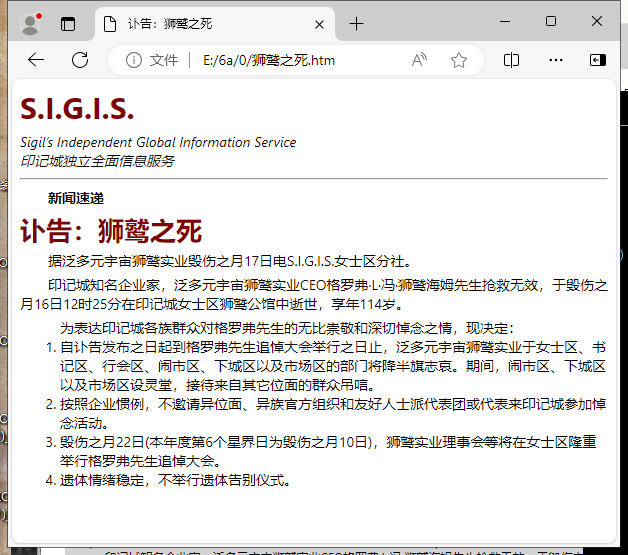
现在让我们翻回到上一次的示例页面中,在其中的head标签内加入一对style双标签,style标签内则包含上述CSS样式。此时,示例页面的代码如下述:
示例页面中的一部分标签进行了调整,将会标绿。
<html lang="zh-CN">
<head>
<meta charset="gb2312">
<title>讣告:狮鹫之死</title>
<style>
body {font-family: Segoe UI,'微软雅黑',sans-serif;}
h1{font-size: 30px; color: maroon; margin-bottom: 4.8px; margin-top: 2.4px;}
h2{font-size: 26px; color: maroon; margin-bottom: 4.8px; margin-top: 2.4px;}
h3{font-size: 22px; color: maroon; margin-bottom: 4.8px; margin-top: 2.4px;}
h4{font-size: 18px; color: maroon; margin-bottom: 4.8px; margin-top: 2.4px;}
h5{font-size: 16px; color: maroon; margin-bottom: 4.8px; margin-top: 2.4px;}
h6{font-size: 14px; color: maroon; margin-bottom: 4.8px; margin-top: 2.4px;}
p{ font-size: 14px; margin-bottom: 4.8px; margin-top: 2.4px; text-indent: 2em; }
.noindent {text-indent: 0;}
table {font-size: 14px; border-collapse: collapse;}
table, th,
td{border: 1px solid black; padding-left: 3.6px; padding-right: 3.6px;}
ul{font-size: 14px; margin-left: 0em; margin-bottom: 4.8px; margin-top: 2.4px;}
</style>
</head>
<body>
<h1>S.I.G.I.S.</h1>
<p class="noindent"><i>Sigil’s Independent Global Information Service<br>
印记城独立全面信息服务</i></p>
<hr>
<p><b>新闻速递</b></p>
<h2>讣告:狮鹫之死</h2>
<p>据泛多元宇宙狮鹫实业毁伤之月17日电S.I.G.I.S.女士区分社。</p>
<p>印记城知名企业家,泛多元宇宙狮鹫实业CEO格罗弗·L·冯·狮鹫海姆先生抢救无效,于毁伤之月16日12时25分在印记城女士区狮鹫公馆中逝世,享年114岁。</p>
<ul style="list-style-type: decimal;">为表达印记城各族群众对格罗弗先生的无比崇敬和深切悼念之情,现决定:<br>
<li>自讣告发布之日起到格罗弗先生追悼大会举行之日止,泛多元宇宙狮鹫实业于女士区、书记区、行会区、闹市区、下城区以及市场区的部门将降半旗志哀。期间,闹市区、下城区以及市场区设灵堂,接待来自其它位面的群众吊唁。</li>
<li>按照企业惯例,不邀请异位面、异族官方组织和友好人士派代表团或代表来印记城参加悼念活动。</li>
<li>毁伤之月22日(本年度第6个星界日为毁伤之月10日),狮鹫实业理事会等将在女士区隆重举行格罗弗先生追悼大会。</li>
<li>遗体情绪稳定,不举行遗体告别仪式。</li>
</ul>
</body>
</html>
然后,我们再保存一次页面,在浏览器中重新打开或刷新这个页面,就能看到最新最in的效果了!